

When evaluating email quality, most senders focus primarily on SPF, DKIM, and DMARC. While these authentication protocols are essential and form the foundation of a secure sending infrastructure, they are not the only factors that determine whether emails reach the inbox or get flagged, filtered, or bounced. Modern mailbox providers analyze hundreds of signals, including infrastructure settings, message structure, content quality, traffic patterns, and historical reputation.
In this article, we explore 10 hidden factors that impact email quality scores in depth. For each factor, we explain why it matters, common causes, its impact on deliverability, and general actions that can be taken. This guide highlights why even fully authenticated emails may still suffer in deliverability if these subtle signals are ignored.
1. Mismatched Authentication Domains
Mismatched authentication domains occur when the domain shown in the From: address does not align with the domains used in SPF and DKIM. Email providers see this as a trust issue and downgrade the Email Quality Score.
Why It Matters
Mailbox providers expect consistency. If SPF or DKIM authenticate using a different domain than the one users see, the message looks suspicious and often fails DMARC alignment. This directly impacts inbox placement and domain reputation.
How It Usually Happens
- Using email services without configuring custom DKIM
- The sending service uses a different MAIL FROM / return-path domain
- Intermediate relays rewrite authentication domains
- Using subdomains that don’t align with the main From domain
- Sending platforms default to signing with their own domain
Typical Example
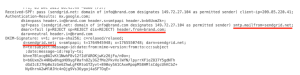
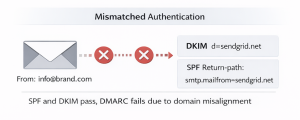
From (header.from): [email protected]
DKIM: d=sendgrid.net
SPF Return-path: smtp.mailfrom=sendgrid.net
SPF and DKIM both pass, but neither matches brand.com, so DMARC fails. This lowers your Email Quality Score and can push messages into spam.
How to Fix It
- Configure custom DKIM using your own domain
- Use a branded MAIL FROM / return-path (e.g., bounce.brand.com)
- Make sure SPF includes the vendor but keeps MAIL FROM aligned with your domain
- Review DMARC alignment requirements to ensure the From domain matches the authentication domains
2. Header Structural Anomalies
Header structural anomalies occur when an email’s header contains irregular, malformed, or non-standard fields. Mail servers expect headers to follow strict RFC formatting, and any deviation can make the message appear suspicious, lowering the Email Quality Score.
Why It Matters
Mailbox providers rely on predictable header structure for authentication and filtering. When headers are incomplete, duplicated, or incorrectly formatted, providers may treat the message as manipulated or spoofed—resulting in reduced trust and potential delivery issues.
Common Causes
- Missing or duplicated mandatory fields (e.g., multiple From: or Message-ID)
- Incorrect header formatting or ordering from misconfigured sending systems
- Improper encoding from CRM/marketing tools
- Additional non-standard headers added by plugins or gateway appliances
- Forwarders or relays rewriting or stripping key header fields
How It Impacts the Quality Score
- Triggers spam filters due to structural irregularities
- Interferes with SPF/DKIM/DMARC evaluation
- Makes the email appear generated by unreliable or unsafe software
- Reduces domain reputation over time due to inconsistent header formatting
How to Fix It
- Ensure your sending platform adheres to RFC header standards
- Remove unnecessary or custom header injections
- Let the SMTP server generate mandatory fields (Date, Message-ID, etc.)
- Validate headers through test sends before rolling out changes
- Review header handling on internal relays to prevent unintended rewrites
3. HTML Structural Noise
HTML structural noise refers to unnecessary, messy, or poorly formatted HTML within the email body. Mailbox providers analyze HTML structure to detect phishing, malware, or low-quality messages. When the HTML contains excessive noise, they treat the message as less trustworthy, lowering the Email Quality Score.
Why It Matters
Emails with clean, well-structured HTML are seen as legitimate and professionally generated. When the HTML is cluttered or broken, filters may interpret it as automated spam, unsafe scripts, or template manipulation. This directly affects how mailbox providers score the message.
Common Causes
- Overly nested or duplicated HTML tags from drag-and-drop editors
- Hidden or unused CSS, scripts, or styling blocks
- Large amounts of inline styles or outdated HTML attributes
- Incorrect closing tags or broken HTML structure
- Copied content from external websites that brings unnecessary HTML fragments
- Overuse of tracking pixels or empty anchor tags
How It Impacts the Quality Score
- Increases spam-scoring signals due to messy or suspicious HTML
- Makes the message harder for spam engines to parse cleanly
- Reduces rendering consistency across clients, leading to lower engagement
- Can break or weaken authentication checks that expect predictable structure
How to Fix It
- Clean and minimize HTML before sending
- Remove unused styling, redundant tags, and unnecessary divs
- Use modern, standard-compliant HTML email templates
- Validate HTML with testing tools before deployment
- Avoid copying styled content directly from websites or documents
- Keep tracking elements minimal and properly formatted
4. Tracking URL Reputation and Redirect Chains
URLs in emails play a major role in email deliverability. Mailbox providers evaluate the reputation of links and monitor redirect chains. Emails containing links with poor reputation or excessive redirects can negatively impact the Email Quality Score.
Why It Matters
Spam filters and security engines check all URLs in an email for:
- Known malicious domains or blacklists
- Excessive or complicated redirects
- Tracking links that obscure the final destination
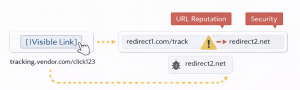
If a URL is flagged or redirects multiple times, the email may be marked as suspicious, even if the sender is authenticated.
Common Causes
- Using tracking services with long or multiple redirect chains
- Linking to domains with low reputation or previously blacklisted URLs
- Shortened links that hide the final destination
- Multiple third-party redirects before reaching the landing page
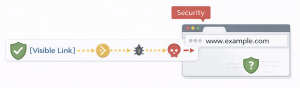
How It Impacts the Quality Score
- Emails with low-reputation URLs are more likely to be flagged as spam
- Excessive redirects slow down URL resolution and trigger spam filters
- Repeated use of suspicious or tracked links lowers sender reputation over time
How to Fix It
- Use reputable tracking and analytics services
- Limit redirect chains to a minimum; ideally, one redirect to the landing page
- Ensure all linked domains have a good reputation
- Avoid using unknown or free URL shorteners in mass emails
- Monitor URL performance and reputation regularly with tools like, Google Safe Browsing, or other threat intelligence services
5. Improper Reverse DNS (PTR / rDNS)
Reverse DNS (PTR) records map a sending IP address back to a recognizable hostname. Mailbox providers use this as a basic identity and legitimacy check for the sending infrastructure. An improper or missing PTR record weakens trust in the sending IP and can negatively impact the Email Quality Score.
Why It Matters
Mailbox providers treat rDNS as a fundamental requirement for any server that sends email. A proper PTR record shows that the IP is intentionally configured for outbound mail and not part of a compromised, anonymous, or residential network. If rDNS is missing or invalid, providers may treat the IP as suspicious, regardless of SPF, DKIM, or DMARC status.
Common Causes
- Sending from a server without a proper rDNS record
- PTR hostname does not resolve forward (no matching A record)
- Cloud or shared hosting services not configured with custom PTR records
- Migrating mail servers without updating reverse DNS
How It Impacts the Quality Score
- Triggers spam filter rules and security checks
- Weakens IP/domain reputation, especially on new or warming IPs
- Causes mailbox providers to distrust or deprioritize messages
- Lowers overall sending-infrastructure credibility
How to Fix It
- Assign a valid PTR record to every active sending IP (if it’s managed by your system).
- Ensure the PTR hostname has a forward-confirming A record pointing back to the same IP.
- Use clear, mail-related hostnames such as mail.example.net or smtp.provider.net.
- For hosted environments, request PTR configuration from your provider if it’s not already in place.
- For self-hosted servers, coordinate with the ISP for proper rDNS setup.
- Test rDNS using tools like nslookup, Dig-X or email header analyzers
6. Forwarding-Triggered Signature Breaks
When an email is forwarded, SPF often fails because the forwarder’s IP differs from the original sending server. DKIM can preserve authentication, but if the message is modified by forwarding services, security gateways, mailing lists, or auto-responders—DKIM breaks, causing DMARC failures and lowering the Email Quality Score.
Why It Matters
Mailbox providers rely on SPF, DKIM, and DMARC to verify email authenticity. During forwarding, SPF failures are expected, so DKIM is critical. Any modification that breaks DKIM makes the message appear suspicious and impacts deliverability and sender reputation.
Common Causes
- Forwarding through personal or corporate services
- Mailing lists or auto-responders that add footers, banners, or headers
- Security gateways or filtering solutions that modify headers, add disclaimers, or sanitize content
- Alteration of email encoding or body during transport
- Dynamic content that gets rewritten or sanitized
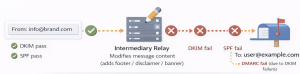
How It Impacts the Quality Score
- DKIM verification fails, breaking DMARC alignment
- Increases spam filter suspicion due to authentication failure
- Lowers sender reputation if forwarded messages frequently fail authentication
How to Fix It
- Minimize modifications when forwarding emails: avoid adding footers, banners, or editing the body and headers.
- If using a security gateway or mailing list, ensure forwarding configurations preserve the original message without modifications.
- Use forwarding systems that support ARC (Authenticated Received Chain) to maintain DKIM verification across forwards.
- Ensure the original message is structured cleanly (valid headers, proper encoding) before forwarding.
- Avoid forwarding dynamic or personalized content that may be rewritten during transit.
- Monitor DMARC reports to identify patterns of DKIM failures caused by forwarding.
7. Alias and Routing Modifications
Alias and routing modifications occur when emails are sent through forwarding aliases, sub-addressing, or routing rules that change the envelope sender or headers. These changes can impact SPF, DKIM, and DMARC alignment, reducing the Email Quality Score.
Why It Matters
Mailbox providers rely on consistent sender information for authentication. When aliases or routing rules modify the MAIL FROM or headers, SPF alignment can fail, DKIM may break if headers are altered, and DMARC alignment may be disrupted. These issues signal potential spoofing or misconfiguration, which can lower deliverability and domain reputation.
Common Causes
- Using forwarding aliases (e.g., [email protected]) without proper SPF/DKIM alignment
- Sub-addressing that changes the envelope sender
- Internal routing rules that rewrite headers or return-path addresses
- Email gateways or routing appliances that modify message headers during transit
- Complex multi-service routing (marketing, transactional, internal) that causes domain misalignment
How It Impacts the Quality Score
- SPF alignment failures due to modified envelope senders
- DKIM breaks if headers are rewritten
- DMARC alignment failures, lowering domain trust and Email Quality Score
- Increased spam filtering likelihood due to inconsistent sender data
How to Fix It
- Ensure all aliases and routing rules preserve alignment with the main sending domain
- Configure DKIM to sign emails from aliases where possible
- Minimize header rewriting during internal routing
- Use standardized sub-addressing formats supported by your email system
- Regularly monitor DMARC reports for failures caused by alias or routing modifications
8. Traffic Pattern Volatility
Traffic pattern volatility refers to sudden or unusual changes in email sending volume, frequency, or recipient distribution. Mailbox providers monitor sending behavior to detect potential spam or compromised accounts. Large spikes or inconsistent patterns can negatively affect the Email Quality Score.
Why It Matters
Consistent sending patterns help mailbox providers build a reputation for your domain and IP. Sudden increases in volume, sending to new regions, or rapid bursts of messages can trigger spam filters or reputation penalties, even if authentication passes.
Common Causes
- Launching large marketing campaigns without gradually warming up your sending IPs or domains
- Sending to new or purchased recipient lists
- Sudden spikes due to system errors or automated processes
- Sending from multiple services or IPs without coordination
- Compromised accounts sending unusual volumes of email
How It Impacts the Quality Score
- Triggers spam filter heuristics for suspicious sending patterns
- Reduces IP and domain reputation due to perceived abuse
- Can lead to temporary throttling or delivery delays
How to Fix It
- Maintain consistent sending volumes and schedules
- Gradually warm up new IPs and domains before sending large campaigns
- Avoid sending to unverified or purchased recipient lists
- Monitor traffic patterns for anomalies using dashboards and alerts
- Coordinate sending across multiple services to prevent spikes
9. Mailbox Provider Internal Feedback Signals
Mailbox providers (like Gmail, Outlook, Yahoo) use internal feedback signals to evaluate email quality and sender reputation. These signals include user interactions, spam complaints, deletions without reading, and engagement metrics. Low engagement or high complaint rates can significantly lower the Email Quality Score, even if authentication passes.
Why It Matters
Mailbox providers want to deliver emails that users engage with. If your emails generate spam complaints, are ignored, or deleted immediately, it signals poor quality. These feedback signals influence spam filtering, inbox placement, and domain reputation.
Common Causes
- Sending irrelevant or unrequested emails
- High unsubscribe rates or spam complaints
- Poorly targeted campaigns with low engagement
- Repeated sending to inactive or invalid recipients
- Email content that appears spammy or misleading
How It Impacts the Quality Score
- Increases spam filtering likelihood
- Reduces inbox placement and engagement metrics
- Damages long-term domain and IP reputation
- Can trigger throttling or temporary blacklisting by mailbox providers
How to Fix It
- Send relevant, targeted content to engaged recipients
- Maintain a clean and verified mailing list
- Provide clear unsubscribe options and honor opt-outs promptly
- Monitor user engagement (opens, clicks, replies) to optimize campaigns
- Avoid sending repetitive or low-value emails that generate complaints
10. Content Fingerprinting and Historical Similarity
Mailbox providers use content fingerprinting and historical similarity analysis to detect patterns in emails. This involves comparing your current messages to past emails sent from the same domain or IP. If the content closely resembles previously flagged or low-quality emails, it can negatively impact the Email Quality Score.
Why It Matters
Providers track repetitive patterns, common spam elements, or historically low-engagement content. Even if your email passes SPF, DKIM, and DMARC, similarity to past flagged messages can reduce deliverability and increase the likelihood of being filtered.
Common Causes
- Sending repetitive or templated content without variation
- Using content similar to previous emails that were marked as spam
- Reusing subject lines or body text across campaigns excessively
- Copying content from sources flagged for spam or poor reputation
- Low engagement on previous campaigns contributing to historical patterns
How It Impacts the Quality Score
- Increases spam filtering probability due to perceived duplication or low-quality patterns
- Reduces inbox placement rates
- Lowers sender and domain reputation over time
How to Fix It
- Vary content between campaigns to reduce similarity to past messages
- Optimize templates for engagement with fresh, relevant content
- Avoid copying content from low-reputation sources
- Monitor historical performance and adjust content based on engagement metrics
- Test new content gradually to avoid triggering content-based filters
Conclusion
Addressing these 10 hidden factors is essential for achieving consistent inbox placement and strong sender reputation. Even fully authenticated emails can be flagged, filtered, or delayed if issues like structural anomalies, routing changes, traffic volatility, or content similarity are overlooked.
By monitoring and optimizing these subtle signals, organizations can reduce spam complaints, improve engagement, and strengthen both IP and domain reputation, ensuring that emails reach recipients reliably and maintain long-term deliverability success.